Table of Contents
Executive Summary: The Re-Verification Shield
- Re-verification is Google’s automated compliance checkpoint triggered when a previously verified listing makes significant modifications to core identity attributes (Physical Address, Primary Category, Business Name, or Phone Number).
- During re-verification, your listing may experience temporary visibility suppression in the Local 3-Pack, but all historical customer reviews, photos, and post updates are preserved intact.
- Before moving your business to a new physical address, pre-update your website schema, corporate registries, and physical exterior signage before changing the address in your GBP dashboard.
- Routine operational updates (updating holiday hours, adding products, publishing posts, or responding to reviews) will never trigger re-verification.
1. Defining Google Business Profile Re-Verification
Google Business Profile re-verification is an algorithmic security challenge deployed by Google’s Trust & Safety infrastructure. Unlike initial verification, which establishes a brand-new entity on Google Maps, re-verification acts as an audit to verify that an existing, verified commercial entity continues to operate legitimately after a major profile change.
Google triggers re-verification primarily to protect consumers from "listing hijacking" or "ghost relocations," where bad actors take over verified profiles and move them across cities to capture local phone calls in new markets.
2. The 5 Main Triggers That Cause Re-Verification Prompts
| Trigger Factor | Algorithmic Sensitivity | Risk Mitigation Protocol |
|---|---|---|
| Address Relocation | Extremely High (95% rate) | Install new exterior signage, update utility bills, and photograph new premises prior to updating dashboard address. |
| Primary Category Change | High (70% rate) | Only change primary category if your commercial business model has fundamentally shifted. |
| Phone Number Swap | High (60% rate) | Ensure the new number is registered in your company name with telecom authorities before updating. |
| Business Name Rebranding | High (65% rate) | Update trademark certificates, physical signage, and website headers simultaneously. |
| Manager Account Changes | Medium (30% rate) | Always use Google Workspace accounts and transfer ownership gradually rather than abruptly removing users. |
4. Step-by-Step Re-Verification Navigation Protocol
Pre-Verification Preparation
Before submitting core edits, ensure your website footer, contact page, and JSON-LD schema reflect the new details. Mount exterior signage at the physical location.
Submit the Single Change
Never update address, phone number, and name simultaneously. Update the address first, clear re-verification, wait 14 days, and then update secondary details.
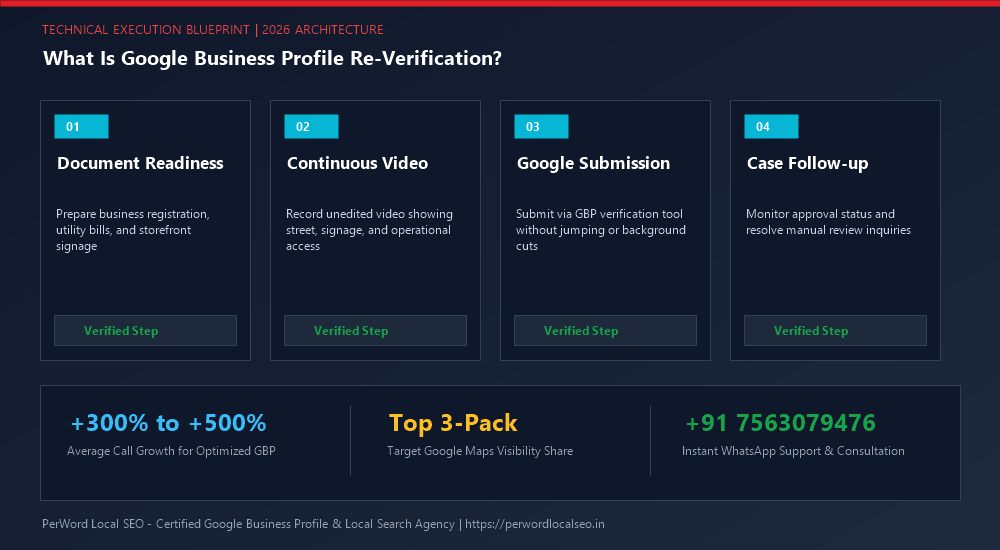
Execute Video or Code Challenge
When Google displays the re-verification prompt, execute the assigned method (Video walkthrough or SMS PIN) within 48 hours to minimize local search ranking downtime.
Verify Review & Photo Preservation
Once approved, check your public profile on Google Maps. Verify that all historical reviews, photos, and Q&A remain perfectly bound to your CID listing.
6. Case Study: 4-Clinic Dental Group Moves Address Without Downtime
Zenith Dental Care Network
The Challenge: Zenith’s primary clinic was relocating 800 meters down the road to a state-of-the-art facility. The listing possessed 480 verified 5-star reviews and ranked #1 across Bangalore South. An improper address update could trigger a suspension, wiping out 6 years of digital authority.
The PerWord Relocation Protocol:
- Week 1: Installed 3D illuminated exterior signage at the new location and obtained a fresh commercial electricity bill under the new street address.
- Week 2: Synchronized the address update on the official website with geo-coordinates in JSON-LD schema and updated top 20 healthcare citations.
- Week 3: Updated the address in Google Business Profile. Google immediately prompted for Video Re-Verification.
- Week 4: Executed a flawless 80-second continuous video recording of the new facility.
Result:
Re-verification approved in 24 hours. Zero reviews lost. The profile retained its #1 ranking for all target orthodontic queries without a single day of revenue interruption.
7. Entity Reconciliation Schema.org Code
<script type="application/ld+json">
{
  "@context": "https://schema.org",
  "@type": "Dentist",
  "name": "Zenith Dental Care Network",
  "url": "https://zenithdental.example.com",
  "telephone": "+91-80-45678901",
  "address": {
    "@type": "PostalAddress",
    "streetAddress": "452, 27th Main Rd, Sector 1, HSR Layout",
    "addressLocality": "Bangalore",
    "addressRegion": "Karnataka",
    "postalCode": "560102",
    "addressCountry": "IN"
  },
  "geo": {
    "@type": "GeoCoordinates",
    "latitude": 12.9116,
    "longitude": 77.6534
  }
}
</script>
8. The 5 Hidden Algorithmic Triggers of Sudden Re-Verification
Many businesses are blindsided by an unexpected re-verification prompt months or years after original approval. These re-verification demands are triggered automatically when Google's neural models detect high anomaly scores:
- Manager Account IP Anomaly: Logging into the profile management console from an untrusted proxy, VPN, or foreign IP address flags the session as an unauthorized takeover attempt.
- Bulk Category Re-alignment: Adding three or more new secondary categories within a 24-hour window triggers an automated sanity audit to ensure category alignment.
- Mass Competitor 'Suggest an Edit' Campaigns: When aggressive competitors submit multiple simultaneous edit suggestions claiming your business is closed or moved, Google algorithms temporarily freeze verification to verify truth.
- Inactive Manager Dormancy: If no administrative actions, posts, or review replies are recorded on the profile for over 180 days, Google may flag the entity as potentially abandoned.
- Telephone Carrier Re-assignment: If your telecom provider updates their CNAM or carrier database records, Google's automated telecom audit bot triggers a verification check.
9. Preventive Protocol: How to Make High-Risk Profile Edits Safely
If you must modify your phone number, business address, or primary category on an established profile, adhere to the following sequence to minimize re-verification downtime:
1. Update Website First
Update your header, footer, contact page, and schema markup on your official website 5 to 7 days before modifying GBP.
2. Synchronize Citations
Update key tier-1 citations (Justdial, IndiaMART, Yelp, Facebook) to ensure Google's knowledge graph detects consistent data.
3. Have Utility Bill Ready
Ensure a fresh commercial electricity bill matching the new address or legal name is downloaded and ready for instant submission.
Need Expert Help with What Is Google Business Profile Re-Verification and How to Handle It?
Is your Google Business Profile stuck in an endless verification loop, or did your video recording get rejected? Do not let technical glitches paralyze your local customer leads. Our certified Google Local SEO specialists resolve complex verification roadblocks and suspensions within 24 to 72 hours.
Frequently Asked Questions (FAQs)
Related Resources & Verification Services
Author: Amit Kumar (Lead Local SEO & GBP Strategist)
Google Certified Search Specialist | 10+ Years Experience in Local SEO & Business Profile Scaling
Amit Kumar has helped over 2,500 businesses in India and internationally secure top-3 Google Maps placement, recover suspended listings, and resolve complex video verification failures. For direct technical inquiries, contact our team below.