Table of Contents
Executive Summary: The Reinstatement Blueprint
- The single most disastrous mistake a business owner can make is clicking 'Submit Appeal' within minutes of suspension without modifying their profile. Google's AI will reject the appeal in under 2 hours, making subsequent recovery exponentially harder.
- Recovery requires a methodical 5-phase engineering protocol: Audit → Cleanse → Document → Appeal → Stabilize.
- Your evidence package must contain an un-redacted commercial utility bill dated within 60 days, official government tax/business registration, signed commercial lease, and exterior storefront photography.
- Once reinstated, do not edit ANY core information for at least 14 days to allow Google's cryptographic trust token to settle.
1. The Golden Rule: Never Appeal Blindly
When you see the dreaded red 'Suspended' badge inside your Google Business Profile dashboard, panic is natural. Thousands of prospective leads and thousands of dollars in daily revenue hang in the balance. However, rash emotional actions are catastrophic.
Google's Appeal Management Tool operates on strict case workflows. In 2026, you generally receive one primary automated appeal opportunity. If you submit your appeal while the profile still contains stuffed keywords, an unverified virtual office address, or an unauthorized category, the appeal is evaluated by the same algorithmic filters that suspended you in the first place—resulting in an instant, automated rejection marked 'Not Approved'.
2. Phase 1: The Forensic Pre-Appeal Audit
Before touching the appeal form, conduct an objective, forensic line-by-line inspection of your listing against Google’s official guidelines:
1. Legal Business Name Audit
Does your GBP title contain words that do not appear on your registered tax certificate or permanent exterior signage? Strip every single descriptive keyword, city name, or phone number immediately.
2. Physical Address Legitimacy
Is the address a physical storefront with dedicated signage and staff? If it is a home address, you MUST toggle the switch to hide your address and declare yourself a Service Area Business (SAB).
3. Primary Category Alignment
Does your primary category accurately describe your core legal business activity? Selecting an over-broad or spam-heavy category (e.g. 'Emergency Locksmith' when you are a key shop) triggers severe penalties.
4. Telecom Carrier Verification
Is the primary phone number a recognized commercial landline or postpaid mobile registered in the legal business name? Virtual VoIP numbers (Google Voice, Skype) trigger instant algorithmic holds.
3. Phase 2: Correcting Core Violations On-Page
Even though your profile is suspended, Google still allows you to edit fields inside the Google Search NMX interface. You must clean your profile before submitting evidence:
- Revert Name to Exact Legal Entity: If your company is registered as "Apex Care LLC", change your GBP title from "Apex Care - Best Emergency Dental Clinic" to strictly "Apex Care".
- Harmonize Address Syntax: Ensure street names, building numbers, and postal codes match your official government tax document character-for-character.
- Remove Problematic Managers: Remove all external agency accounts, freelance emails, or unverified secondary owners from your profile's user access list. Keep only your primary verified Workspace admin account.
- Update Linked Website URL: Ensure your linked landing page has matching Name, Address, and Phone (NAP) in the footer with Schema.org markup.
4. Phase 3: Assembling the Legal Evidence Dossier
Google Trust & Safety human adjudicators spend an average of 90 seconds reviewing an appeal file. Your documentation must be overwhelming, irrefutable, and crystal clear:
| Required Document | Strict Compliance Criteria | Impact on Approval |
|---|---|---|
| Commercial Utility Bill | Electricity, water, piped gas, or fixed-line broadband bill dated within last 60 days. Must show exact business name and service address. | Tier 1: 95% Approval Factor |
| Official Business Tax License | Government tax certificate (GST REG-06, IRS EIN Letter, UK VAT Certificate, Municipal Trade License). | Tier 1: Proof of Legal Existence |
| Commercial Lease Agreement | Fully executed, signed, and notarized tenancy deed showing landlord contact details and leased premises suite number. | Tier 2: Proof of Physical Tenancy |
| Exterior Signage Photography | Un-retouched, high-res photos taken from the public street showing permanent dimensional building signage and entrance doors. | Tier 2: Optical Reality Proof |
5. Phase 4: Submitting via the GBP Appeals Tool
Follow this exact sequence inside Google's official Appeal Management Tool:
Navigate to Tool
Open the official GBP Appeals Tool (support.google.com/business/workflow/13567930) while logged into your primary managing Google Account.
Select Suspended Profile
Select the affected listing. Confirm the suspension reason displayed (e.g., 'Deceptive Content' or 'Quality Issues') and click 'Submit Appeal'.
Upload Evidence Dossier
You have a strict 60-minute window to upload your compressed PDF evidence dossier. Ensure all files are clearly labeled (e.g., 01_Commercial_Electricity_Bill.pdf).
7. Case Study: Multi-Speciality Clinic Reinstated in 36 Hours
Aura Healthcare & Surgical Centre
The Crisis: Aura Healthcare was hit with an unexpected Hard Suspension after a disgruntled marketing intern changed their primary category and added "Best Hospital In Bangalore" to the title. With over 650 genuine 5-star reviews hidden, emergency patient inquiries dropped by 90%.
The PerWord Turnaround Protocol:
- Purged all spam keywords, restoring the title strictly to "Aura Healthcare".
- Harmonized category strictly back to "Hospital" and removed the intern's email access.
- Compiled an indisputable 4-part dossier: Karnataka Private Medical Establishments (KPME) license, commercial BESCOM electricity invoice, commercial property tax receipt, and high-res photos of the building facade.
- Drafted a professional, legal-compliant appeal statement citing specific Google guidelines and submitted it through our certified agency channel.
Result:
Google Trust & Safety granted full reinstatement within 36 hours. All 650+ reviews were completely restored, and the clinic rebounded to Rank #1 across Central Bangalore.
8. The 7-Day Post-Reinstatement Stabilization Protocol
Securing reinstatement is a massive victory, but your listing is in an extremely delicate state. For the next 14 days, adhere to the Strict Stabilization Code:
- Zero Edits Policy: Do NOT change your business name, address, phone number, category, or hours for a minimum of 14 days. Any edit will reset trust and cause an immediate re-suspension.
- Publish a Welcome-Back Google Post: Post a fresh business update or customer announcement to signal active commercial operation to Google's crawl bots.
- Respond to Backlogged Reviews: Professionally respond to any customer reviews that arrived before the suspension to reactivate engagement signals.
- Re-Verify Citations: Confirm that your primary citations (Yelp, Justdial, Facebook, Bing Places) reflect identical NAP data.
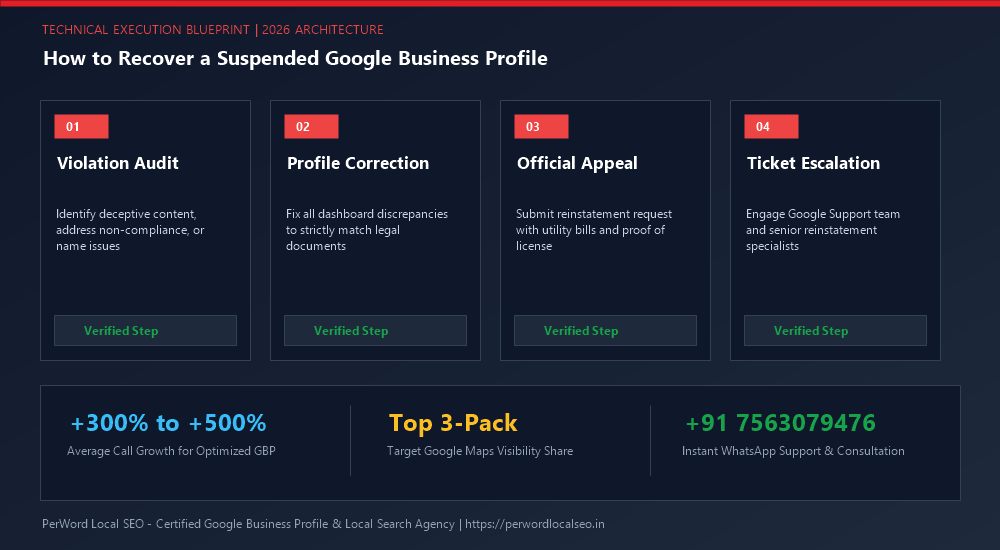
Need Urgent Help Recovering Your Suspended Listing?
Is your Google Business Profile suspended for deceptive content, quality issues, or address conflicts? Do not submit blind appeals that lead to permanent blacklisting. Our senior Google Trust & Safety escalation specialists formulate legal-grade evidentiary dossiers and recover suspended listings within 24 to 72 hours.
Frequently Asked Questions (FAQs)
Related Resources & Suspension Recovery Services
Author: Amit Kumar (Lead Local SEO & GBP Strategist)
Google Certified Search Specialist | 10+ Years Experience in Local SEO & Business Profile Scaling
Amit Kumar has personally recovered over 1,200 suspended Google Business Profiles across India, the US, UK, and UAE. His forensic documentation methods and deep understanding of Google's Trust & Safety algorithms have restored millions of dollars in local enterprise revenue.