Table of Contents
Executive Summary: The Soft Suspension State
- A Soft Suspension occurs when Google strips ownership rights from the managing Google Account while leaving the business listing publicly visible on Google Maps and Google Search.
- Your customers can still search for your brand, view old photos, and write reviews, but you cannot edit information, reply to reviews, post updates, or view performance analytics.
- Soft suspensions are far less dangerous than hard suspensions because your accumulated review history and map pin coordinates remain completely intact in the Google Knowledge Graph.
- Re-verifying a soft-suspended profile requires completing a standard verification challenge (usually video verification or document upload) from a clean, authorized Google Account.
1. What Is a Soft Suspension?
In the taxonomy of Google Business Profile penalties, a Soft Suspension represents a loss of administrative managerial authority rather than a permanent entity purge. When Google issues a soft suspension, its algorithms conclude: "This physical business exists and serves customers, but we no longer trust the managing Google Account to represent it."
As a result, your listing reverts to an 'unmanaged' or 'unverified' state on Google Maps. If a customer visits your listing, they will see an option titled 'Own this business? Claim it now'. Inside your Google Search NMX console, the profile status is flagged with a yellow or orange badge reading 'Suspended' or 'Re-verification required'.
2. Soft vs. Hard Suspension: The Diagnostic Matrix
| Diagnostic Dimension | Soft Suspension | Hard Suspension |
|---|---|---|
| Public Visibility on Google Maps | Visible to Public | Completely Removed (De-indexed) |
| Customer Reviews & Photos | 100% Intact & Searchable | Hidden / Inaccessible |
| Managerial Control & Edits | Locked / Read-Only | Locked / Read-Only |
| Local 3-Pack Rankings | Slowly degrades over 30-60 days | Instantly dropped to 0 |
| Recovery Complexity | Moderate: Re-verification Challenge | High: Full Legal Appeal & Audit |
3. The 5 Most Frequent Causes of Soft Suspensions
1. Manager Account Inactivity or Flag
The managing Google Account was flagged for security concerns, password leaks, or multi-factor authentication dormancy, prompting Google to unbind the account from the profile.
2. Routine Periodic Re-Certification
In high-risk service categories, Google periodically un-verifies listings every 2 to 3 years to ensure the physical storefront is still operating and has not closed down.
3. Telecom Carrier Discrepancy
Google's automated telecom audit bot detected that the phone number on file had a change in carrier ownership or failed automated line-ping checks.
4. Address Character Modification
Making a minor typographic edit to the street address (e.g. changing 'Street' to 'St.' or adding a floor number) resets verification status to unverified.
5. The Step-by-Step Soft Suspension Reclamation Protocol
How to Safely Reclaim Verified Control
- Do Not Delete the Profile: Never hit 'Remove business' from your dashboard. Doing so relinquishes ownership of the live listing and exposes it to competitor hijacking.
- Inspect Verification Options: Click the 'Get verified' or 'Verify' button inside your Search NMX panel. Note whether Google offers Video Verification, Phone SMS, or Document Upload.
- Execute the Verification Prompt: If video verification is requested, follow the 3-Zone filming protocol (Street Context → Exterior Signage → Interior Unlocking).
- If Verification Loop Occurs: Submit an official support ticket via the GBP Help Portal attaching your commercial electricity bill and GST/tax registration certificate.
6. Pre-Re-Verification Safety Protocol: Preventing Hard Ban Escalation
The greatest danger during a soft suspension is accidentally escalating it into a permanent hard suspension. When business owners rush to click 'Get Verified' without inspecting their profile, they frequently trigger secondary anti-fraud tripwires. Adhere to these essential safeguards:
Inspect Visual Storefront Coherence
Ensure permanent signage with your exact business name is clearly mounted. If you operate as an SAB, confirm your address is toggled off before initiating re-verification.
Harmonize Utility Invoices
Have a commercial utility bill matching your exact registered business name and street address dated within the last 60 days ready in PDF format.
Cleanse Manager User Permissions
Remove any external freelance accounts, former employees, or secondary email accounts that may have poor account trust ratings.
Secure Managing Account with 2FA
Activate Google Authenticator or hardware security keys on the Primary Owner account to eliminate security flag triggers.
7. Case Study: Restaurant Reclaims Lost Profile Control
Saffron Grand Fine Dining
The Bottleneck: Saffron Grand's managing owner changed his Google Account recovery phone number. Google's security algorithms triggered an automated soft suspension. The restaurant was still visible on Maps with 850 reviews, but the owner could not update their festive holiday buffet hours or reply to weekend reviews.
The PerWord Reclamation Protocol:
- Verified that the public listing was intact and reviews were safely attached.
- Created a fresh, dedicated Google Workspace administrator account (
admin@saffrongrand.com). - Completed a seamless 3-minute video verification walkthrough showing the grand dining hall, kitchen prep stations, and FSSAI state food hygiene license.
Result:
Full verified administrative control restored in 24 hours. Zero reviews lost. Saffron Grand published their Diwali banquet updates, capturing over ₹32,00,000 in festive catering reservations.
7. Restaurant Schema Entity Synchronization
<script type="application/ld+json">
{
  "@context": "https://schema.org",
  "@type": "Restaurant",
  "name": "Saffron Grand Fine Dining",
  "url": "https://saffrongrand.example.com",
  "telephone": "+91-40-67891234",
  "servesCuisine": "North Indian, Mughlai, Hyderabadi",
  "address": {
    "@type": "PostalAddress",
    "streetAddress": "Road No 36, Jubilee Hills",
    "addressLocality": "Hyderabad",
    "addressRegion": "Telangana",
    "postalCode": "500033",
    "addressCountry": "IN"
  },
  "geo": {
    "@type": "GeoCoordinates",
    "latitude": 17.4325,
    "longitude": 78.4071
  }
}
</script>
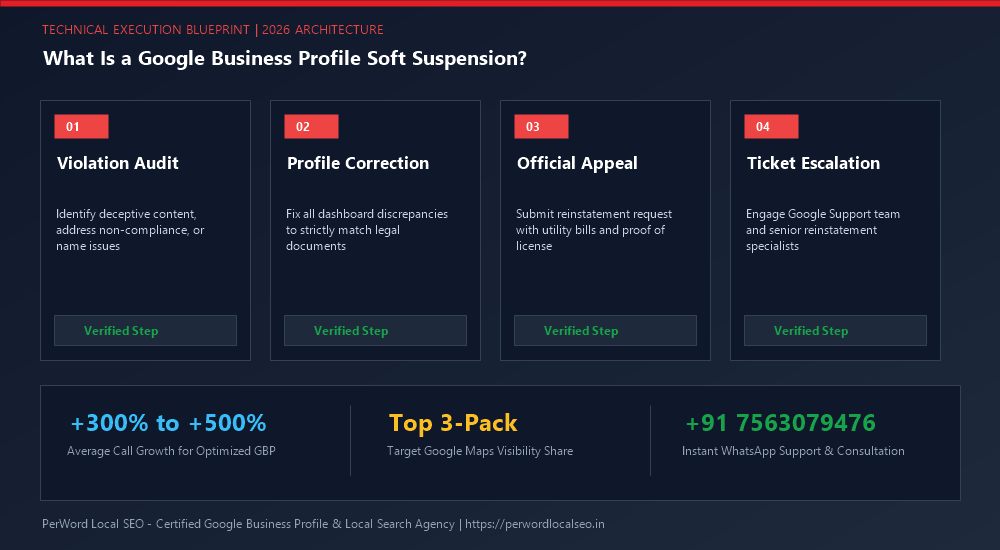
Need Urgent Help Recovering Your Suspended Listing?
Is your Google Business Profile suspended for deceptive content, quality issues, or address conflicts? Do not submit blind appeals that lead to permanent blacklisting. Our senior Google Trust & Safety escalation specialists formulate legal-grade evidentiary dossiers and recover suspended listings within 24 to 72 hours.
Frequently Asked Questions (FAQs)
Related Resources & Suspension Recovery Services
Author: Amit Kumar (Lead Local SEO & GBP Strategist)
Google Certified Search Specialist | 10+ Years Experience in Local SEO & Business Profile Scaling
Amit Kumar has personally recovered over 1,200 suspended Google Business Profiles across India, the US, UK, and UAE. His forensic documentation methods and deep understanding of Google's Trust & Safety algorithms have restored millions of dollars in local enterprise revenue.