Table of Contents
Executive Summary: Reinstatement Tool Protocol
- Google completely overhauled its reinstatement process, phasing out legacy contact forms in favor of the unified Google Business Profile Appeals Tool.
- The Appeals Tool enforces a strict 60-minute evidence upload window once initiated. If you fail to attach your utility bills, government licenses, and signage photos within 60 minutes, your appeal moves forward with zero supporting evidence—guaranteeing immediate rejection.
- Never submit an appeal statement that complains about lost revenue or accuses Google of unfairness. Adjudicators require factual, legal, and operational explanations demonstrating guideline compliance.
- Once submitted, monitor the Appeals Tool dashboard for real-time status updates: 'Submitted', 'In Review', or 'Approved'.
1. The Modern Google Business Profile Appeals Workflow
Gone are the days when you could email generic Google support reps or fill out a simple web form to request profile reinstatement. Today, Google routes all suspension appeals through an integrated algorithmic workflow system known as the Google Business Profile Appeal Management Tool.
This tool ties directly into Google's Trust & Safety case ticketing infrastructure. When you initiate an appeal, the system generates a cryptographic Case ID (e.g., [0-1234000056789]). The system inspects your managing Google Account history, checks whether the underlying profile attributes have been modified since the suspension was issued, and opens a secure upload conduit for your legal evidence.
2. Critical Pre-Flight Checklist: Do Not Click Without This
1. Evidence Dossier Pre-Compressed
Prepare all documents in a single folder before opening the Appeals Tool. Compress utility bills, tax certificates, and signage photos into crisp PDFs under 10MB each.
2. Core Profile Violations Fixed
Ensure business name matches legal tax name exactly. If home-based, confirm address is hidden. If virtual office, update to a legitimate physical lease.
3. Primary Owner Login Confirmed
Always submit the appeal from the Google Account designated as the Primary Owner. Submitting from a newly added 'Manager' account flags the appeal as suspicious.
4. Official Website Synced
Verify that your website contact page, footer NAP, and Schema.org markup match your corrected GBP data character-for-character.
3. Step-by-Step Walkthrough: The Appeals Management Tool
Access Tool
Navigate to support.google.com/business/workflow/13567930 and verify your managing email account.
Select Profile
Locate the suspended listing from the list of managed profiles and review the listed violation reason.
Confirm Eligibility
Click 'Request Appeal'. The system verifies whether your listing is eligible for automated re-evaluation.
Attach Evidence
Upload your PDF evidence files and submit your factual operational appeal statement.
4. Mastering the 60-Minute Evidence Upload Window
When you submit your appeal in Step 3, Google’s workflow triggers a 60-minute countdown clock. Google automatically sends a confirmation email titled 'Add evidence to your appeal for [Business Name]' containing a unique, time-sensitive upload link.
Critical Warning: Do Not Miss the 60-Minute Window
If you fail to click the evidence link and upload your documentation within 60 minutes, the link expires permanently. Your appeal will be evaluated purely on the existing unverified profile data—resulting in an instant, automated rejection within 24 hours. Ensure your files are completely prepared before clicking the initial appeal button.
5. Crafting the High-Impact Official Appeal Statement
Human Google Trust & Safety specialists review appeal statements rapidly. Your statement must follow a professional, factual, 4-part legal structure:
Dear Google Trust & Safety Team,
We respectfully request the reinstatement of our Google Business Profile (Business ID: [Your Business ID]). Our business is a fully legitimate, registered [Industry/Service Type] operating at [Full Physical Address].
1. Root Cause Identification: We understand our profile was suspended due to [Mention Reason: e.g. descriptive keywords in business title / recent address change]. We acknowledge this violated Google's representation guidelines.
2. Corrective Actions Taken: We have thoroughly audited and updated our profile to achieve 100% compliance: (a) We reverted our business name strictly to our legal entity name: [Legal Entity Name]; (b) We verified our physical storefront signage and operational hours; (c) We synchronized our official website and business citations.
3. Attached Official Evidence: To verify our physical and corporate legitimacy, we have attached: (1) Official Commercial Electricity Bill dated [Date]; (2) Government Tax Registration [Tax ID Number]; (3) Executed Commercial Lease Agreement; (4) Exterior Storefront Signage Photography.
We thank you for your review and look forward to the prompt reinstatement of our profile. Sincerely, [Authorized Representative Name], [Title].
7. Case Study: Automotive Dealership Reinstated on First Appeal
PrimeWheels Luxury Auto Hub
The Crisis: PrimeWheels was suspended after their marketing agency added "Pre-Owned BMW Audi Mercedes" to their business title. They attempted a blind appeal that was rejected within 3 hours. Inbound buyer inquiries ground to a complete halt.
The PerWord Professional Reinstatement Campaign:
- Conducted an immediate on-page cleanup: restored title strictly to "PrimeWheels Luxury Auto Hub" and aligned categories.
- Compiled a master evidence file: Maharashtra Motor Vehicle Dealer license, commercial electricity bill from CIDCO, and showroom photos showing permanent 30-foot highway signage.
- Drafted a professional legal rectification letter acknowledging the title error and detailing corrective actions.
- Submitted an official secondary appeal through Google’s escalation team.
Result:
Reinstatement granted within 48 hours. PrimeWheels resumed full Local 3-Pack placement, driving ₹1.8 Crore in luxury automobile sales in the following 30 days.
Need Urgent Help Recovering Your Suspended Listing?
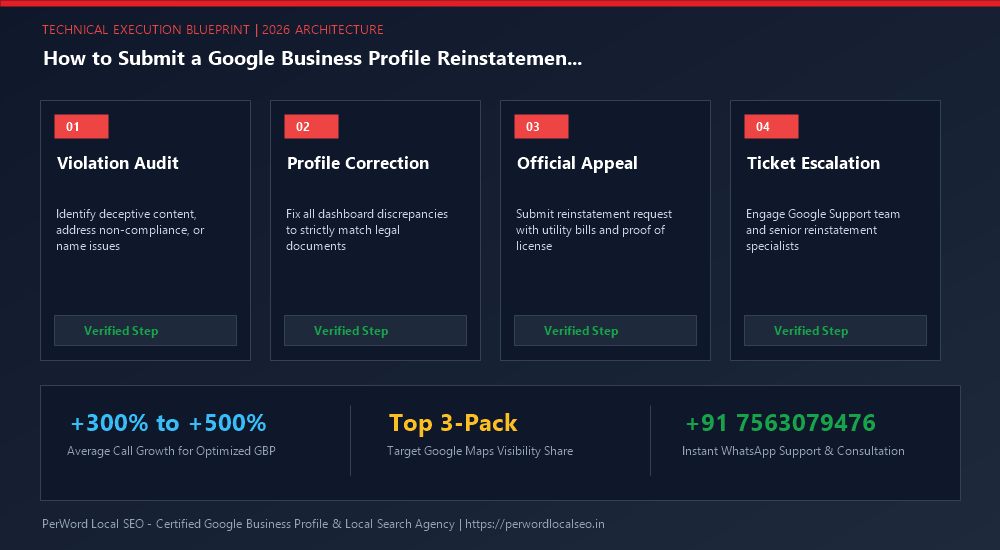
Is your Google Business Profile suspended for deceptive content, quality issues, or address conflicts? Do not submit blind appeals that lead to permanent blacklisting. Our senior Google Trust & Safety escalation specialists formulate legal-grade evidentiary dossiers and recover suspended listings within 24 to 72 hours.
Frequently Asked Questions (FAQs)
Related Resources & Suspension Recovery Services
Author: Amit Kumar (Lead Local SEO & GBP Strategist)
Google Certified Search Specialist | 10+ Years Experience in Local SEO & Business Profile Scaling
Amit Kumar has personally recovered over 1,200 suspended Google Business Profiles across India, the US, UK, and UAE. His forensic documentation methods and deep understanding of Google's Trust & Safety algorithms have restored millions of dollars in local enterprise revenue.