Table of Contents
Executive Summary & Location Rules
- Physical location data anchors your business in Google's Knowledge Graph, dictating the epicenter of your local search proximity radius.
- Using virtual offices, P.O. boxes, UPS mailboxes, or unstaffed shared desks in co-working facilities triggers an immediate, catastrophic hard suspension for Misrepresentation.
- If your business operates from a residential home or travels to clients (plumbing, electrical, mobile consulting), you MUST select the Service Area Business (SAB) option to conceal your address.
- When relocating to a new physical address, modifying your existing listing with verified documentation preserves 100% of your accumulated customer reviews and listing age authority.
1. Storefront vs. Service Area Business Address Rules
Google Business Profile enforces strict policies regarding whether your address may be displayed publicly on Google Maps:
- Physical Storefront Businesses: Permitted to display their street address ONLY if they maintain permanent, professionally fabricated exterior signage displaying the exact business name, have dedicated private office space, and maintain active staff present during all stated operating hours. Customers must be able to visit during posted hours without pre-arranged appointments.
- Service Area Businesses (SAB): Businesses that deliver services directly to customer locations (e.g., plumbers, locksmiths, roofers, mobile pet groomers, cleaning crews) or operate out of a private residential home must conceal their street address. Google requires these businesses to specify service areas by entering cities, counties, or specific postal codes within a two-hour driving radius (typically maximum 50 km / 30 miles).
- Hybrid Businesses: Businesses that both welcome walk-in customers at a physical storefront and offer delivery services (such as restaurants offering dine-in and home delivery, or auto repair shops offering mobile roadside assistance) can display their physical address AND configure designated service areas.
The Co-Working Space & Virtual Office Trap
Renting a virtual mailbox, a shared hot-desk, or a day pass at a co-working space (e.g., WeWork, Regus, Awfis) to fake a prestigious commercial address is the single fastest way to get your Google Business Profile permanently banned. Google maintains an exhaustive database of known co-working facilities and virtual office addresses. Unless you rent a dedicated, enclosed private commercial suite, have permanent signage on the building directory, and have your own employees stationed there during open hours, Google will instantly suspend your listing.
3. Address Normalization & Postal Standards
Address normalization is the practice of standardizing street abbreviations and building identifiers across every digital directory. Google's geocoding algorithms compare your address format against municipal postal databases:
| Address Component | Normalized Best Practice Format | Improper Conflicting Format | Algorithmic Impact |
|---|---|---|---|
| Suite / Floor Identifier | Suite 402, 4th Floor, Tower 2 | Ste. 402 / #402 (Inconsistent abbreviations) | Minor Citation Noise |
| Commercial Facility Name | Express Trade Tower, Sector 132 | Near Advant Navis, Behind Metro Station | Geocoding Failure |
| Postal Code Alignment | 201304 (Exact Commercial PIN Code) | 201301 (General District PIN Code) | 3-Pack Proximity Mismatch |
| Cross Streets / Landmarks | Leave in secondary line or omit | Put landmarks in primary address line | Postal Verification Failure |
4. Precision Map Pin Calibration & Lat/Long Geocoding
When you submit an address, Google's mapping API converts the text into latitude and longitude coordinates. If your office is located inside a 50-acre corporate tech park or a massive shopping mall, the automatic geocoding algorithm usually drops the pin in the middle of a parking lot or access highway.
How to Calibrate with Micro-Precision:
- Open your Google Business Profile in Google Search by typing
my business. - Click Edit profile → Location → Business location.
- Click on the map preview box to open the interactive map pin editor.
- Toggle the map view from default Map to Satellite View.
- Zoom in completely until individual building structures, walkways, and doors are visible.
- Drag the red pin directly above the physical customer entrance door of your private commercial suite.
- Click Save. Google will update your coordinates within minutes.
5. Step-by-Step Protocol to Add or Update Address
To ensure your address addition or update passes through Google's automated compliance filters without triggering a re-verification nightmare:
Step 1: Pre-Align Supporting Documentation
Update your official tax registration (GST / Trade License), your commercial broadband fiber bill, and your bank account statement to reflect the new address before modifying your Google Business Profile.
Step 2: Update Website Footer & Schema
Update the physical address in your website footer, Contact Us page, and embed the updated PostalAddress schema markup in your website code.
Step 3: Execute Address Edit in Dashboard
Access Google Search → Edit profile → Business location → enter the exact normalized address. Adjust the map pin position carefully and click Save.
Step 4: Complete Video Re-Verification
If prompted for re-verification, record a continuous smartphone video showing the exterior street sign, building entrance, office interior, and official lease paperwork.
6. Safe Relocation: Moving Without Losing Reviews or Rankings
The most common catastrophic mistake business owners make when moving to a new office is creating a brand-new second listing for their new location and abandoning the old one. This causes severe damage:
- You lose all accumulated 5-star customer reviews, review history, and listing age authority.
- Google flags both listings as duplicates, splitting ranking equity and triggering mutual suppression.
The Correct Relocation Protocol: Always update the address on your existing verified listing. If your move is within the same metropolitan market (e.g., moving from Sector 18 to Sector 62 in Noida), updating the address maintains 100% of your reviews and preserves your listing's algorithmic age and prominence.
7. Troubleshooting Address Errors & Verification Blocks
| Address Error Phenomenon | Underlying Cause | Corrective Action |
|---|---|---|
| Address Already Managed by Another Business | Previous tenant did not mark their old listing as permanently closed or relocated. | Submit a Request Ownership request via Google. If unanswered in 3 days, request unblocking through Google Support. |
| Address Verification Video Loop | Video did not show street signs or exterior building context clearly. | Re-film in broad daylight starting from the opposite side of the street showing neighboring commercial signage. |
| Map Pin Snaps to Center of City | Street name or house number not recognized in Google's postal GIS dataset. | Manually enter latitude and longitude coordinates and calibrate the map pin via satellite view. |
8. Real-World Case Study: Zero-Downtime Clinic Relocation
Vanguard Orthopedic & Spine Institute
The Situation: Vanguard Orthopedic moved from an older clinic in Green Park to a state-of-the-art facility in Saket. The management was terrified of losing their 312 Google reviews and top-3 ranking positions.
The PerWord Strategy: Two weeks prior to the move, our team pre-aligned their lease agreement, broadband bills, and website schema. On moving day, we executed the address update in the dashboard, completed a verified video walkthrough of the new facility within 2 hours, and updated 45 core directory citations. The listing maintained its #1 rank with zero downtime and 100% review retention.
6. Multi-Tenant Commercial Complexes & Shopping Malls: The 'Located Within' Protocol
Operating within large mixed-use developments, industrial clusters, or multi-level shopping centers presents unique address challenges:
- The 'Located Within' Anchor: Google Business Profile provides a specialized relationship attribute labeled "Located Within". When you specify that your clinic or retail outlet is located inside "Pacific Mall Tagore Garden" or "DLF Cyber City Tower B", Google's mapping engine tethers your entity to the parent building's high-authority footprint. This helps prospective clients navigate parking structures and building entrances without frustration.
- Unit, Floor & Suite Disambiguation: Never combine floor and suite numbers into one messy sentence. Standardize your address into logical lines: Line 1 = Shop/Unit Number, Line 2 = Floor and Tower Name, Line 3 = Parent Complex Name.
- Preventing Duplicate Floor Conflicts: If another business previously occupied your exact commercial unit, ensure that business has marked their listing as permanently closed or relocated. Otherwise, Google's automated systems may merge your profile with the old tenant's listing.
7. Address Formats Across International Borders: India, US, UK & GCC Postal Nuances
Google's entity normalization bot applies distinct validation parameters depending on the sovereign nation in which your listing resides:
- India (PIN Code Precision): Indian addresses frequently rely on informal landmarks (e.g., "Opposite Metro Pillar 124"). While helpful for local auto-rickshaws, Google's algorithmic geocoder struggles with landmark strings in the primary address line. Keep the primary line strictly to Plot/Shop number, Sector/Colony, and 6-digit PIN code. Place landmarks in the secondary descriptor field.
- United States & Canada (USPS Standard CASS): US listings are cross-referenced directly against the United States Postal Service (USPS) Coding Accuracy Support System (CASS). Any deviation in standard abbreviations (e.g., using 'Boulevard' instead of 'Blvd' or omitting directional quadrants like 'NW') can trigger validation delays.
- United Kingdom (Royal Mail PAF): UK profiles are audited against the Royal Mail Postcode Address File (PAF). Entering an exact valid postcode automatically resolves street names and borough designations.
- GCC & Middle East (Makani & Building Numbers): In markets like Dubai (UAE) or Riyadh (Saudi Arabia), Google increasingly references municipal digital smart navigation systems like Dubai Makani numbers and Saudi National Address building codes.
8. Physical Signage Specifications for Video Verification
During Google's mandatory smartphone video verification, automated OCR scans your signage. To avoid immediate automated rejection, your signage must adhere to these physical engineering standards:
Compliant Signage Materials
- Permanently mounted 3D acrylic channel letters affixed to the exterior building facade.
- Professional ACP (Aluminum Composite Panel) signboards bolted above the entrance door.
- Official commercial building lobby directory boards displaying your suite number.
Prohibited Temporary Signage
- Paper printouts taped to glass doors or acrylic stands.
- Temporary flex vinyl banners held up with rope or tape.
- A-frame sidewalk chalkboard signs or magnetic car door decals used for storefronts.
9. LocalBusiness PostalAddress Schema Code
<script type="application/ld+json">
{
  "@context": "https://schema.org",
  "@type": "MedicalClinic",
  "name": "Vanguard Orthopedic & Spine Institute",
  "image": "https://example.com/clinic-facade.jpg",
  "@id": "https://example.com/#medicalclinic",
  "url": "https://example.com",
  "telephone": "+91-7563079476",
  "address": {
    "@type": "PostalAddress",
    "streetAddress": "Plot 12, District Centre, Saket",
    "addressLocality": "New Delhi",
    "addressRegion": "Delhi",
    "postalCode": "110017",
    "addressCountry": "IN"
  },
  "geo": {
    "@type": "GeoCoordinates",
    "latitude": 28.5284,
    "longitude": 77.2185
  }
}
</script>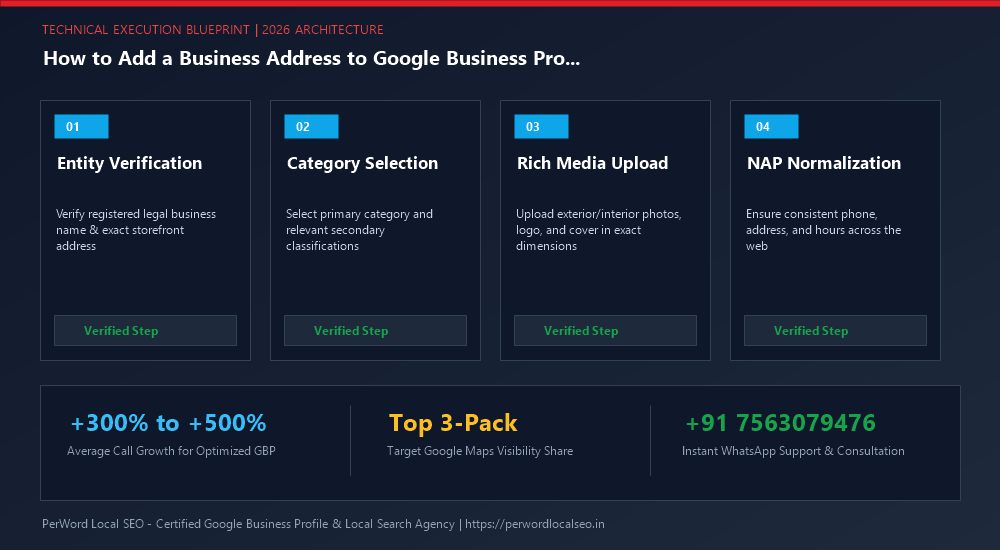
Need Expert Help with How to Add a Business Address to Google Business Profile?
Is your phone number stuck in pending review? Did your live video verification get rejected, or has your profile suffered an unexpected suspension? Do not risk permanent account loss. Our certified Google Local SEO engineers resolve complex issues within 24 to 72 hours with 100% money-back guarantee.
Frequently Asked Questions (FAQs)
Related Resources & Local Services
Author: Amit Kumar (Lead Local SEO & GBP Strategist)
Google Certified Search Specialist | 10+ Years Experience in Local SEO & Business Profile Scaling
Amit Kumar has helped over 2,500 businesses in India and internationally secure top-3 Google Maps placement, recover suspended listings, and capture sustainable local inbound leads. For direct technical inquiries, contact our team below.