Table of Contents
Executive Summary: Verification Mastery
- Never initiate the verification button until your official website, physical signage, telecom registration, and Google Search Console property are 100% harmonized. A premature verification attempt with contradictory signals triggers instant failure.
- When executing Video Verification, follow the 3-Zone Capture Rule: Zone 1 (Street Signs & Surrounding Businesses), Zone 2 (Exterior Permanent Signage & Building Entrance), and Zone 3 (Internal Management Proof: Unlocking the Door, POS Terminal, Business Cards, Invoices).
- Service Area Businesses (SABs) with hidden addresses must record branded commercial vehicles, trade equipment, inventory storage, and official municipal licenses during video verification.
- If Google's verification tool loops or fails repeatedly, never delete and recreate the profile. Deleting profiles compounds risk scores. Instead, escalate via the Google Business Profile Verification Appeal Tool with certified proof of licensing.
1. The Pre-Verification NAP & Entity Audit
The single most common mistake local business owners make is rushing to click "Verify Now" immediately after creating a profile. Google’s automated verification algorithms cross-reference your Name, Address, and Phone number (NAP) across hundreds of public telecom registries, corporate registrar databases, and web directories within milliseconds.
Execute this mandatory 5-point pre-flight checklist prior to verification:
| Audit Item | Verification Requirement | Common Rejection Risk |
|---|---|---|
| Storefront Signage | Permanent, immovable exterior signage matching exact profile name. | Paper or vinyl banners flagged as temporary spam. |
| Domain Synchronization | Google Search Console ownership verified on same managing Google account. | Generic Gmail accounts face 4x higher video audit rates. |
| Telecom Carrier Line | Phone number registered to the business entity with regional telecom provider. | VoIP numbers (Skype, Google Voice) blocked from phone verification. |
| Official Documents | Electricity/water utility bill dated within 60 days under exact commercial name. | Mismatched suite numbers or abbreviations trigger manual rejection. |
| Map Pin Calibration | Pin dropped precisely at the physical customer entrance door, not street center. | Discrepancies with Street View trigger physical location doubts. |
2. Navigating Assigned Verification Pathways
When you enter the verification portal, Google presents the specific method assigned to your profile by its risk-scoring algorithm. While you cannot manually toggle between options, understanding how each channel functions ensures flawless execution:
Pathway A: Mobile Video Recording
Scan the on-screen QR code using your smartphone. A web browser session opens inside Google's secure camera portal. You must capture a single, unbroken video recording covering street context, storefront entrance, and internal operations.
Pathway B: Phone Call / SMS PIN
Google sends an automated voice call or text message containing a 6-digit verification code. Ensure your IVR or receptionist transfers the call immediately. You have 30 minutes to input the PIN into the prompt box.
Pathway C: Official Domain Email
Google sends a verification link to an email matching your website domain (e.g., contact@yourcompany.com). Simply click the authorization button to verify immediately.
Pathway D: Live Interactive Video Call
A Google customer support specialist connects via Google Meet. You must walk through the facility live, showing business licenses, tools of the trade, employee presence, and physical keys.
4. Video Recording Execution Blueprint (The 3-Zone Rule)
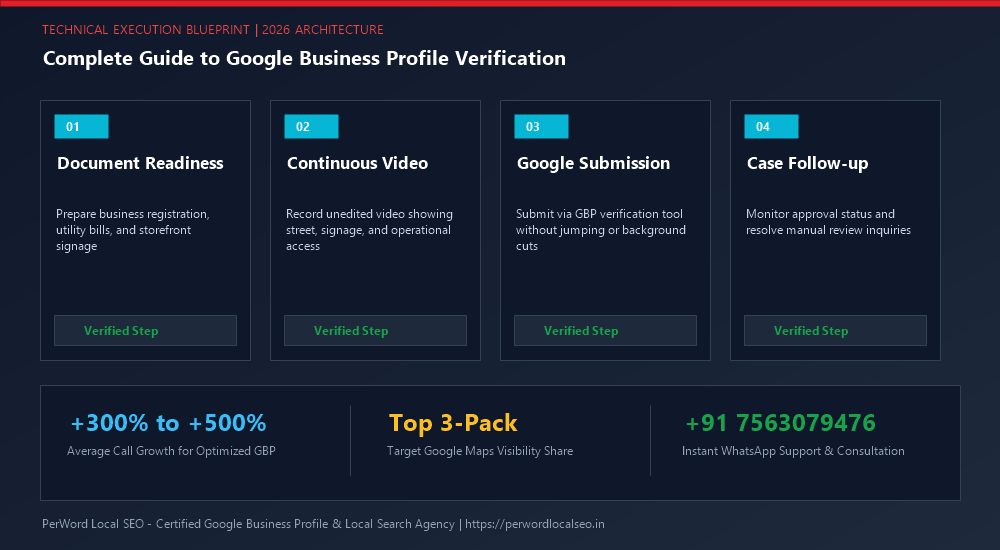
Over 85% of video verification rejections stem from failing to provide continuous proof across all three mandatory environmental zones. Follow this exact 90-second choreography:
The 90-Second Continuous Take Choreography
- Seconds 0 to 25 (Zone 1 - External Spatial Location): Stand outside on the public sidewalk. Pan 180 degrees showing the municipal street name signs, adjacent commercial buildings, parking lot, and house/building number plaques matching your address.
- Seconds 26 to 55 (Zone 2 - Storefront & Business Signage): Walk continuously toward your establishment without cutting the recording. Clearly film your permanent exterior signage, commercial glass door lettering, operating hours plate, and entrance directory.
- Seconds 56 to 90 (Zone 3 - Operational Management Authority): Unlock the front door using your physical keys. Walk into the private staff area or reception. Film the Point of Sale (POS) billing terminal logged in, company stationery, tax certificates on the wall, business cards, and specialized equipment (e.g., medical chairs, tool racks).
6. Common Verification Error Codes & Immediate Fixes
| Error Symptom | Root Cause | Technical Remediation Protocol |
|---|---|---|
| "Verification Failed" Immediately After Video | Video lacked street context or was flagged for camera shake and low lighting. | Wait 48 hours for the button to reset. Re-shoot outdoors in bright daylight starting at the street corner. |
| Endless "Processing Verification" (5+ Days) | Listing stuck in manual security review queue due to category risk. | Open the Google Business Profile Verification Appeal Tool and submit utility bills and lease deeds. |
| "Couldn't send code to this number" | Phone number is identified as virtual VOIP, prepaid burner SIM, or unassigned. | Update to a postpaid commercial landline or official mobile number registered with telecom authorities. |
| Profile Demands Re-verification After Edit | Major change made to business name, address, or category shortly after approval. | Keep all core information stable for 60 days following initial verification. |
7. Case Study: Multi-Bay Auto Collision Center Approved in 24 Hours
Prestige Collision Works
The Challenge: Because automotive body shops are heavily targeted by fake lead generation listings, Prestige Collision was rejected twice on video verification. Google's automated vision system could not confirm that their industrial warehouse was an active customer-facing facility.
The PerWord Verification Solution:
- Installed clear illuminated 3D acrylic signage at the industrial road entrance matching the exact registered legal entity.
- Choreographed a pristine 105-second continuous video recording beginning at the Phase II landmark roundabout, proceeding through the gated entrance, into the customer reception lounge, and into the computerized paint booth showing active certified technicians.
- Submitted an synchronized GST registration certificate, commercial electricity bill, and commercial property lease deed.
Result:
Profile successfully verified in under 24 hours. Prestige Collision captured Rank #1 across South Delhi for "Luxury Car Denting & Painting", generating ₹32,00,000 in repair billings within 90 days.
8. Structured Data Validation Schema
<script type="application/ld+json">
{
  "@context": "https://schema.org",
  "@type": "AutoBodyShop",
  "name": "Prestige Collision Works",
  "url": "https://prestigecollision.example.com",
  "telephone": "+91-11-45678901",
  "taxID": "07AAAAA1234A1Z5",
  "address": {
    "@type": "PostalAddress",
    "streetAddress": "Plot 84, Okhla Industrial Area Phase II",
    "addressLocality": "New Delhi",
    "addressRegion": "Delhi",
    "postalCode": "110020",
    "addressCountry": "IN"
  },
  "geo": {
    "@type": "GeoCoordinates",
    "latitude": 28.5355,
    "longitude": 77.2731
  }
}
</script>
Need Expert Help with Complete Guide to Google Business Profile Verification: Step by Step?
Is your Google Business Profile stuck in an endless verification loop, or did your video recording get rejected? Do not let technical glitches paralyze your local customer leads. Our certified Google Local SEO specialists resolve complex verification roadblocks and suspensions within 24 to 72 hours.
Frequently Asked Questions (FAQs)
Related Resources & Verification Services
Author: Amit Kumar (Lead Local SEO & GBP Strategist)
Google Certified Search Specialist | 10+ Years Experience in Local SEO & Business Profile Scaling
Amit Kumar has helped over 2,500 businesses in India and internationally secure top-3 Google Maps placement, recover suspended listings, and resolve complex video verification failures. For direct technical inquiries, contact our team below.