Table of Contents
Executive Summary: Google Business Profile Posts
- Google Business Profile Posts (officially labeled Google Updates) are micro-content broadcasts published by verified business owners that render directly inside their Google Knowledge Panel and Google Maps listing.
- Unlike posts on Facebook or Instagram that fade into social algorithmic feeds, Google Posts appear at the point of highest purchase intent—when a consumer is actively searching for your service in Google Maps.
- There are three primary post categories: Add Update (general announcements, service highlights), Add Offer (promotional discounts, coupon codes), and Add Event (workshops, community seminars, seasonal sales).
- Google's search crawlers index post text, frequently generating bold "Justifications" in the local 3-Pack whenever post copy matches specific long-tail user queries.
1. Defining Google Business Profile Posts (Google Updates)
Google Business Profile Posts are free digital promotional billboards integrated directly into your Google Maps entity. Originally introduced by Google in 2017 to allow brick-and-mortar storefronts to communicate real-time updates, Posts have evolved into an indispensable conversion and local SEO asset.
When a prospective client searches for your business or browses local categories on their smartphone, your active Google Posts appear under the "Updates" or "Overview" tab in your knowledge panel. They feature rich photography, promotional headlines, descriptive body copy, and interactive call-to-action buttons (such as "Book", "Call Now", "Learn More", or "Get Offer").
2. The 3 Primary Post Types: Update, Offer & Event
Google structures posts into three core formats, each engineered for distinct commercial objectives:
| Post Type | Core Capabilities & Required Fields | Strategic Use Case |
|---|---|---|
| 1. Add Update (Standard) | Photo/Video (up to 10), 1,500 characters of descriptive text, customizable action CTA button. | Weekly service spotlights, employee introductions, new equipment announcements, FAQs. |
| 2. Add Offer | Title, Start & End Dates, Coupon Code, Redeem Online URL, Terms & Conditions link. | Seasonal discounts (15% off spring AC tune-up), holiday packages, first-time client specials. |
| 3. Add Event | Event Title, Date Range, Exact Start & End Times, Event Description, Action Button. | Free public webinars, charity fundraisers, store grand openings, holiday pop-up workshops. |
3. Anatomical Anatomy: Visuals, Copy & Action Buttons
To maximize click-through and engagement, every Google Post must be engineered across its core components:
High-Impact Visuals
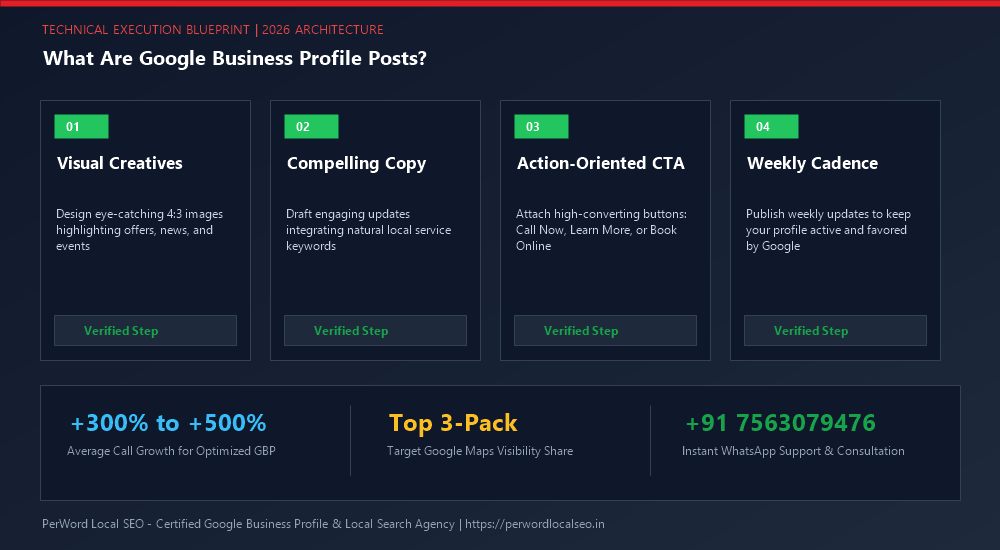
Use 4:3 or 16:9 ratio high-resolution imagery (1200x900px). Avoid generic stock imagery; real storefront and team photos generate double the clicks.
Front-Loaded Copy
While Google allows up to 1,500 characters, only the first 80 to 100 characters appear before the "More" truncation cutoff on mobile viewports.
Frictionless CTA Button
Always configure an active button: "Call now" for emergency trades, "Book" for clinics and salons, or "Learn more" with UTM tracking parameters.
4. Post Lifespan, Archival Rules & Visibility Triggers
In older Google Business Profile versions, standard update posts expired and disappeared after 7 days. Today, Google maintains standard updates in your profile carousel indefinitely, though their visual prominence naturally recedes as newer posts are published.
Offer and Event Posts remain prominently featured until their scheduled expiration date passes. During the active window of an Offer post, Google frequently places a special yellow or green discount tag on your 3-Pack snippet, drastically boosting customer CTR over nearby rivals.
5. GBP Posts vs. Traditional Social Media (Meta, LinkedIn, X)
Many business owners make the mistake of treating Google Business Profile like Instagram or Facebook. The user mindset on these platforms is entirely different:
| Platform | User Intent Mindset | Conversion Velocity | SEO Algorithmic Weight |
|---|---|---|---|
| Google Business Profile | High Buying Intent: User is actively looking to hire or visit right now. | Immediate: One tap to call or navigate directly to the shop. | Direct impact on 3-Pack justifications and entity relevance. |
| Facebook / Instagram | Passive Discovery: User is casually browsing social entertainment feeds. | Slow / Funnel: Requires multi-touch nurturing and re-targeting. | Zero direct impact on Google Maps local rankings. |
| Professional Networking: B2B relationships and career updates. | Long Cycle: Enterprise B2B contract negotiations. | Corporate entity crawling only; minimal local Maps lift. |
6. Unlocking Dynamic Post Justification Badges in 3-Packs
One of the most valuable hidden benefits of posting regularly is triggering Post Justifications. When a consumer searches for a specific phrase (e.g., "organic sourdough bakery" or "tankless water heater rebates"), Google's algorithm searches your recent posts.
If your post from 3 days ago mentioned that exact service, Google will display your listing in the 3-Pack with a blue quotation snippet reading: "Posting mentions: 'We now carry artisan organic sourdough baguettes'". This justification overrides competitors who do not have topical recency.
Want a Fully Managed Google Post Strategy?
PerWord Local SEO authors, schedules, and optimizes weekly high-conversion Google Business Profile posts engineered to unlock 3-Pack justifications and drive phone calls.
7. Case Study: Specialty Bakery 4x In-Store Orders via Daily Posts
Client Profile: A gluten-free artisanal bakery in Portland, Oregon, struggled to communicate its rotating daily specialty menus. Despite 4.9 stars, foot traffic on Tuesdays and Wednesdays was slow.
The Strategy:
- Implemented a 4-day-a-week GBP posting calendar publishing daily photos of fresh pastries exiting the oven at 7:00 AM.
- Wove in localized keyword phrases like "gluten-free cinnamon rolls in Portland" and "dairy-free sourdough bread".
- Deployed Offer Posts every Tuesday offering a "Buy One Coffee, Get a Free Mini Muffin" digital coupon.
The Results: Over 90 days, the bakery gained 18 post justification badges across Portland search queries. Mid-week morning foot traffic surged by +210%, and direction requests on Google Maps quadrupled from 85/week to 350/week.
8. Content Policy Pitfalls: Avoiding Post Rejections
Google uses aggressive automated AI filters that reject posts containing prohibited elements:
- Phone Numbers in Post Text: Including a phone number inside the written body copy will cause an instant automated rejection. You must use the dedicated "Call now" button instead.
- Excessive Punctuation or Caps: Writing in ALL CAPS or using multiple exclamation marks ("SALE TODAY!!!!!") triggers Google's spam filter.
- Stock Photography Watermarks: Images with commercial watermarks or heavy promotional text overlays covering more than 20% of the image will be rejected.
- Regulated Products: Businesses in regulated niches (alcohol, firearms, tobacco, vape, CBD, adult services) cannot post offers or discounts.